Hello Ashes of Creation and Controller enjoyers.
I wanted to share some good news regarding my experience successfully using a controller with Ashes of Creation.
In my experience it is possible to play Ashes of Creation on a controller and play it well.
I am using the Elecom JC-DUX60BK USB 24 Button MMO Gamepad Black (
https://www.amazon.com/ELECOM-Controller-Buttons-Memorize-JC-DUX60BK/dp/B01NBKEGOX?th=1) as my controller and Joy2Key (
https://joytokey.net/en/purchase) for the emulation software.
This was around $40.00 when I bought it and I spent a few dollars for the protection plan.
Unfortunately, it appears that its price has gone up, probably due to tariffs, and it’s now closer to $50.00 and the protection plans have gone up accordingly.
My Elecom Controller appears to be well made, comfortable and easy to use. I actually plan on buying a second one in the near future as a backup.
Because be aware that there is about a month wait on the controller as it’s being shipped directly from Japan. Although mine arrived early in less than 3 weeks.
The controller comes with it’s own programming software but it’s in Japanese and unfortunately I am not proficient in Japanese.
So instead I’m using Joy2Key to program my controller. Joy2Key is shareware but you can buy a license for $7.00 if you want to support the developers.
Joy2Key is simple and easy to use. When you plug your controller in you should have a red light under the profile on your controller. Open Joy2Key and press a button. You’ll notice that a line in Joy2Key application lights up. Program whatever you want the key to be and make sure that whatever that is matches the in game keybinding. Repeat and have fun.
Personally I bound my skills to 1-0 and then two other keys. Then I programmed the second skill bar to be the same plus shift and the third skill bar to be the same plus control.
Here’s my keybindings but it is specific to what I programmed into the game and Joy2Key:
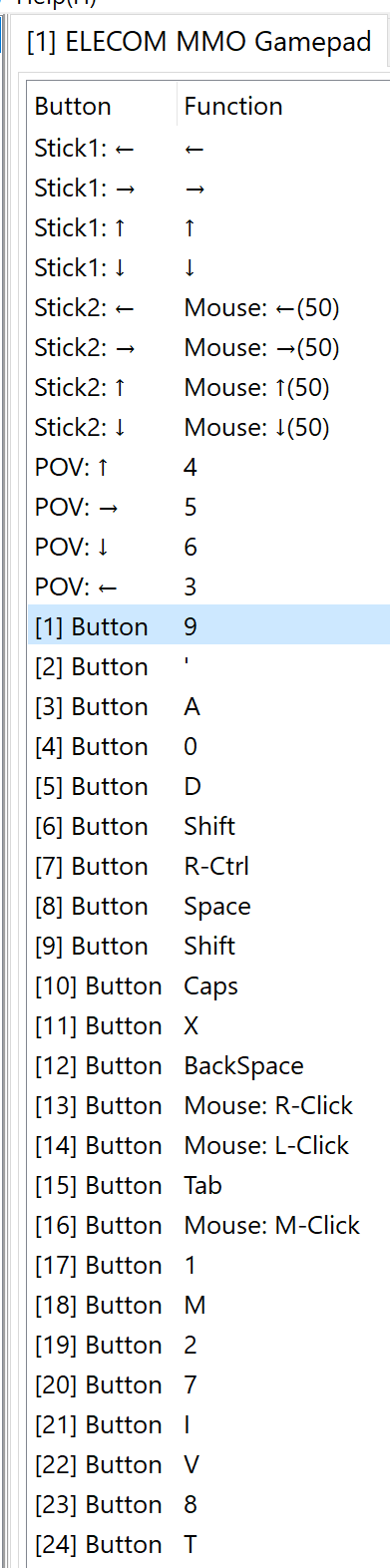
Your’s will probably be specific to you.
But if you want to see what’s possible with this controller checkout this Reddit post from a FFXIV player (
https://www.reddit.com/r/ffxiv/comments/pvgxa9/24_button_gamepad_for_ffxiv_basic_review_and_setup/) who has programmed it with much more in depth than mine.
So far I have no problems with the controller. But there is a learning curve if you’re not used to using so many keys, as I am.
I have had a few issues at points where I couldn’t go in and out of action mode but I think that may partly been a bug present in the game. The other part, is really one of the only shortcomings that I can think of about using this controller, or any, with Ashes of Creation. Remember that we are emulating a mouse and keyboard so you’re actually moving the cursor of your mouse. In my experience you’ll want to try and keep that cursor in the middle of the screen because it appears if you’re at the edge of the screen you can’t turn further. Also, during combat, you’ll want to minimize any unnecessary parts of your ui, for me, my chat and quests, because your cursor can get stuck in or on them which can prevent you from moving, aiming and usually happens at the most inconvenient times and could result in an unfortunate xp debt.
This isn’t a perfect solution but, with the small annoyances and shortcomings that I have outlined above, it’s solidly like around 95% of the way there.
I think that the only thing that could improve upon it is in game controller support, which I hear has been confirmed. I do hope so because, to the devs, using controllers isn’t always just a preference. I have a shoulder injury and a friend of mine is in his seventies and we both find mouse and keyboard to not be an option for us.
But until in game controller support comes, in my opinion, here’s a suitable solution to play on a controller and when/if it does come you will be prepared to enjoy it fully.
FYI-This is only my experience. So do your own research and use at your own risk. Have fun!
Sincerely,
Ghost