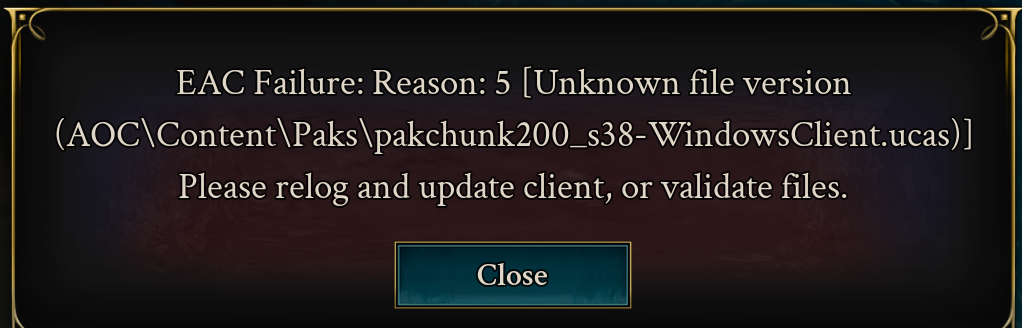
screen attached
Same issue, even having the problem after verifying game files. After 9 years of development there isn't much to show for it.
FOUND THE FIX! you must relocate steam out of the program X86 folder. goto steam and save the steam app folder to desktop. uninstall steam, reinstall on C: drive in new folder. copy Steam app folder back into steam log back into steam. launch game.. that fixed it for me.
We are still actively investigating this issue and any additional information may be useful.
If you are experiencing this issue regularly, fully logging out of Steam and the game before patching or verifying files may help.
Same issue, but only after ~20 seconds of being in-game. Game will freeze, kick me to character select and show the below:
After following the other comments, deleting the problem file and verifying integrity seems to have fixed the job.
Like 30 seconds into the game after this morings patch 2025-12-19, I get error of some resources missing or something like that.
After I press close game closes and i'm logged out so cannot report it in game. I've tried to relog and start the game again and same error occurs. Don't know how to validate files
The exact same thing is happening to me.😥
I've had this issue the other day (albeit a different packchunk file). Close the game down, navigate to the file and delete it, then verify integrity files through steam and re-launch.
We are making progress on this issue.
Still happening - I've tried 2 different servers. US servers.
since the update i can´t play. For me its "unknown file version AOCClient.exe"
I even deinstalled the game and downloaded it again, still same problem.
same here, I try all the solution, delete single file, verify file, change the setting of the steam upgrade like Margaret wrote in the discord. Delete the game, download again all and reinstalled, other person try to move also to different file. Delete the appdata directory. Try to reinstall the anticheat with administrator, run steam with administrator, disable antivirus. Clear the cache of steam.
We finished the possible solution
Since this morning update, I can't log in. Get login error. Verified files but still a no go.
Having the same issue after the latest update. Reinstalled the game, restarted machine, verified file integrity and still it persists with EAC error 5
I
Any Update? have tried every work around to no avail, waiting for Official notice this is fixed
Still dosent work for me even after the update :(
Same, updated and still getting the same
still have this issue. Can play approx. 5 min, then comes the error window :(
It looks like you're new here. Sign in or register to get started.
Resolver not registered: react.custom.0199b6d0-d352-7162-a5b8-ddd4c6d40976